 AFF
AFF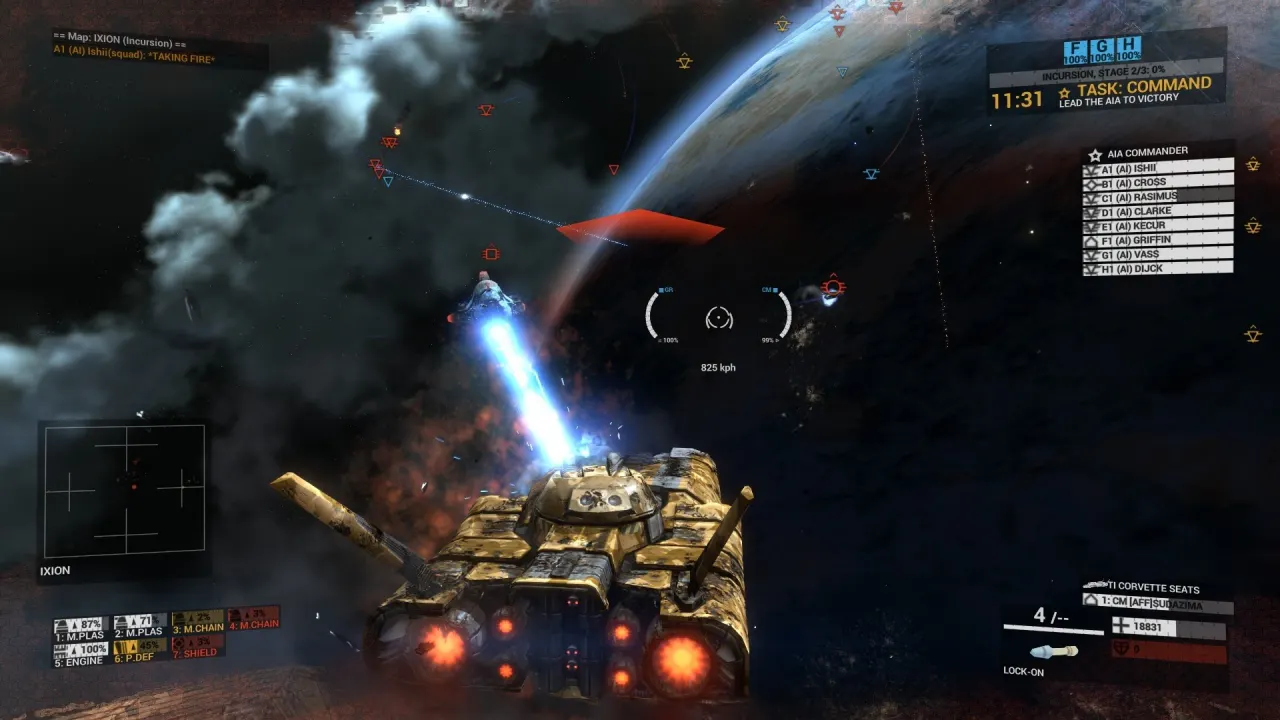
Angels Fall First Beginner's Guide (1.0): From First Spawn to First Win
A complete getting-started guide for Angels Fall First 1.0 — tutorials, game modes, spawning, HUD, progression, loadouts, and the mistakes every new player makes.
Published July 14, 2026
Angels Fall First is a combined-arms sci-fi shooter where one match can carry you from a rifle fight, into a tank, into a fighter launched from a capital ship, and finally through the corridors of the enemy flagship you just boarded. It reached 1.0 in July 2026 after a decade in early access, and the launch version is the most newcomer-friendly it has ever been. This guide takes you from install to competence.
Step 0: Do the tutorials, use the practice arenas
Version 1.0 shipped four official tutorials — infantry, vehicles, ships and command — plus damage-free practice arenas where you can test any weapon or vehicle without being shot. Do the infantry tutorial before your first match; do the others as each system becomes relevant. The tutorials cover things veterans assume everyone knows (tagging, the tac map, loadout budgets) and that this game historically never explained.
Recommended learning order, one system at a time:
- Infantry on ground maps — learn objective flow by following the largest friendly group.
- Ground vehicles — start with a light transport, not a tank.
- Fighters — the space tutorial teaches launch, flight modes, and landing.
- Capital ships and command — last, once you understand what orders mean on the ground.
The two factions
Every match is the United League (ULA) versus the Antarean Empire (AIA). Roles mirror each other — both have carbines, tanks, gunships, bombers, battleships — but the hardware differs: the AIA leans on plasma weapons, hovertanks and fast handling; the ULA on conventional ballistics and railguns. Your career progression covers both, so switch freely.
The two game modes
Incursion is attack and defence in stages. Attackers push through two or three stages of objectives (capture zones, hack consoles, destructible targets) against a timer; defenders bleed that timer dry. It plays like a sci-fi Rush mode.
Territories is five-point conquest (three points on space maps). Holding points fills your faction’s progress bar; first to 100% wins. Simpler, and the better mode for learning maps.
Ground maps and space maps are separate — a match doesn’t move between them — but space maps still contain infantry combat aboard ships and stations, and boarding actions are where they collide. The map database covers every map and mode.
Spawning: locations and deploy zones
AFF’s spawn system confuses everyone at first. You spawn at a deploy zone inside a location. On ground maps there’s one location with several deploy zones — pick one from the tac map and go.
On space maps, locations are ships. You spawn as infantry inside a frigate, battleship or station, then reach the battle by launching a fighter from the hangar. Smaller capital ships are squad-only locations. If a friendly dropship has boarded an enemy ship, the breach point is a spawnable location too. Avoid spawning into dropships as a new player — you’ll end up as passive cargo.
Reading the HUD
- Armour (yellow) regenerates; health (red) does not — only medpacks restore it. “Shields” in this game means the deployable bubble and vehicle shields, not your regenerating bar.
- G tags whatever you’re aiming at — enemies, friendlies, objectives. Target info appears bottom-right; your squad’s orders live there too (“Freelance” means no order set).
- C holds open the command rosetta for orders and vehicle acceptance.
- The tac map (Esc) is your mission map and spawn selector. Live in it.
- Kill feed note: objectives being “completed” by the enemy includes them destroying your forward spawns.
Your first loadouts
There are no classes; you build loadouts against three point budgets (Combat 100 / Support 50 / Command 50 to start) that grow with ranks. The full system has its own guide, but day-one rules:
- Equip the KMD Multitool in every build. It revives, repairs, and restores armour.
- One primary weapon, loot the second from the fallen to save budget.
- Take a medpack and munitions pack in the kit slots and drop them wherever your team defends.
- New players get a scaling damage reduction buff (about 50% at first). Be brave; it fades as you rank.
Ready-made builds by role: best loadouts guide.
Progression: three tracks
Everything you do feeds one of three career tracks — Combat (damage, kills), Support (heals, revives, repairs, resupply), Command (giving and following orders). Ranks add loadout budget: +10 Combat or +5 Support/Command per rank, permanently, across all servers including offline bot matches. The scoreboard ranks players by the sum of all three, so a good medic routinely out-scores a good shot.
Commanders, squads, and why you should care
At round start each team nominates a commander who directs eight squad leaders from the tac map; leaders relay orders to their squads. Follow your orders and everyone in the chain earns Command XP — it’s free progression for doing what helps win anyway. If your name tops the squad list, you are the squad leader: hold C, tag targets with G, and give simple attack/defend orders. Full details: commander guide and squad leader guide.
Vehicles arrive automatically
You don’t buy vehicles at a pad — the game offers them as your score climbs. A prompt appears; accept via Esc-map or the C rosetta and the vehicle airdrops in with you aboard. Which vehicle depends on the map and your total score, and you can be blocked by budget if your vehicle loadout is too rich for your ranks. Vehicle basics live in the ground vehicles guide and space combat guide.
Two habits that mark a good vehicle player from day one: keep your front armour toward the enemy (rear hits hurt more), and retreat to repair with the Multitool instead of dying with an expensive asset.
Mistakes every new player makes
- Skipping the Multitool. You are giving up revives, repairs, and the entire Support track.
- Fighting without orders. Freelancing earns less XP and usually loses. Follow the squad order; it’s marked on your HUD.
- Spending the whole budget on one weapon. Kit wins matches; guns just win fights.
- Taking a battleship helm in your first hour. Capital ships are team assets. Crew one first — man a gun, run repairs — before you captain one.
- Ignoring the map vote. AFF has dozens of scenarios; vote for ground Territories maps while learning.
- Quitting after one confusing match. The learning curve is front-loaded. Match three feels completely different from match one.
Playing solo and co-op
Every scenario runs offline with up to 64 bots filling both sides, identically to online play. 1.0’s Update 30 made bots meaningfully smarter and cheaper on CPU. Progression counts, so offline is a legitimate way to rank up, learn maps, and test loadouts. You can also host co-op with friends against bots — set match parameters from Operations, and change Offline to Internet to open a listen server.
Related guides
Get Angels Fall First on Steam
Buy Angels Fall First on Steam — version 1.0 with solo, co-op and PvP, plus full bot fill.
Frequently Asked Questions
Is Angels Fall First worth playing solo?
Yes. Every scenario supports offline play with up to 64 bots filling both teams identically to multiplayer, and 1.0's bots are smarter and cheaper on CPU. Progression also advances offline.
Should I do the tutorials?
Yes — 1.0 shipped four dedicated tutorials covering infantry, vehicles, ships and command, plus damage-free practice arenas. They cover controls the game will otherwise never tell you.
What faction should I pick, ULA or AIA?
Mechanically they are mirrored in roles but differ in weapons and vehicles: the AIA (Antarean Empire) is lore-wise faster and more advanced with plasma-heavy weapons, the ULA (United League) more conventional. Try both — your career progression applies to both factions.
Why can't I equip more gear?
Everything costs points from three budgets — Combat, Support and Command — that grow as you rank up each track. New accounts start at 100/50/50. See our loadout budget guide for the full system.