 AFF
AFF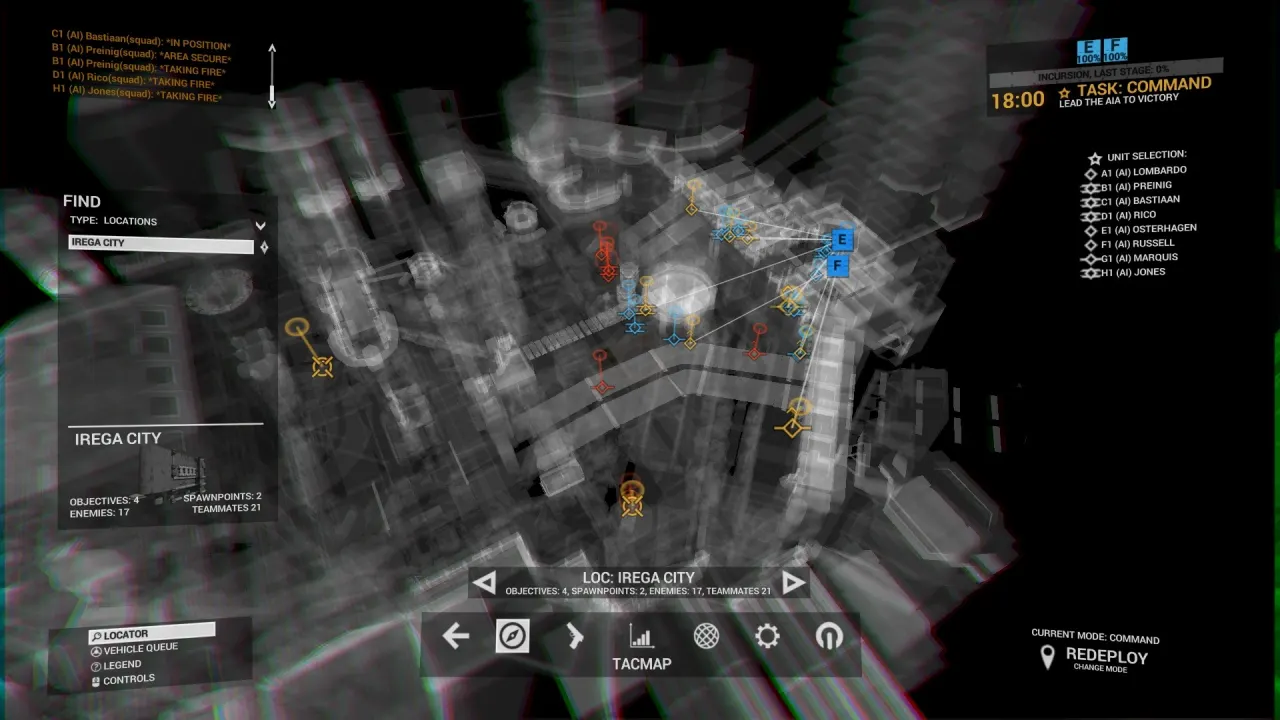
Squad Leader Guide: Command Points and Squad Orders in Angels Fall First
How squads work in Angels Fall First — becoming squad leader, issuing orders with the C menu and tac map, earning Command XP for your whole squad, and leading bots effectively.
Published July 14, 2026
Squads are where Angels Fall First’s command system touches every player. Even in a match with a silent commander and a team of bots, a squad leader who issues twenty seconds of orders per stage will visibly swing the game — and get paid Command XP for it. Here’s the whole job.
Squad structure
Each team divides into up to eight squads of four. The commander (human or the default Milnet AI) directs squad leaders; leaders direct members. Your squad panel sits top-right of the HUD: gauges show each member’s health state, and red means “no orders” — a persistent red panel is a leader asleep at the wheel.
If your name tops the squad list, you’re the leader. There’s no ceremony; the game just expects orders from you now. On space maps your squad matters even more: smaller capital ships are squad-only spawn locations, so your squad is also your ship’s crew.
Issuing orders: the two interfaces
The C rosetta (fast, in the field): tag a target, objective or position with G, hold C, and the first command slot becomes a context action — attack this, capture this, move here. Select individual members or the whole squad. This is the muscle-memory path: tag, C, order, done, back to shooting.
The tactical map (deliberate, between fights): open the map, click members (or select all), right-click a map objective. Better for staging multi-step plans — set a rally short of the objective, let the squad mass, then push the attack order.
Orders are cheap, instant and repeatable. The failure mode is never “too many orders”; it’s silence.
The Command XP loop
Command experience flows to:
- You, for setting objectives that get completed;
- Your members, for completing objectives they were ordered to;
- The commander above you, when their orders cascade through you.
Practically: put the squad on the objective your team is already fighting for, fight there with them, and the yellow track climbs for four people at once. Each Command rank is +5 to everyone’s Command budget — the loadout points that pay for tactical kit. A squad that runs orders all match ends it measurably richer than one that freelances. (Details on budgets: loadout & budget system.)
If you’re a member, not a leader: follow the order on your HUD. “Task” beats “Freelance” for XP and for winning. If the order is insane, the squad list is small — say so, or just outvote it with your feet and the leader will usually re-order onto the real fight.
Leading bots: the hidden RTS
Bots follow squad orders literally and reliably. A full bot squad is effectively four controllable AI soldiers, and 1.0’s smarter bots (Update 30) hold their own in fights. Patterns that work:
- Bodyguard: order all bots to follow you; you now push objectives as a five-man stack.
- Fire base: move bots to a defensible position overlooking the objective, then flank alone — the bots hold attention while you take the point.
- Zone defence: in Territories, park pairs of bots on two captured points and play the third yourself. Bots defending a point they’re standing on are shockingly effective.
- Crew: on space maps, order the squad into your capital ship — bots man guns and the ship stops being half-empty.
Solo players: this is the best reason to lead a squad even offline. The command layer works identically against bots, XP included.
Squad leading by mode
Incursion, attacking: stage objectives come in pairs or triples. Take the one adjacent to your team’s mass, order the squad onto it before respawning members leave the deploy screen, and re-order the instant the stage breaks. Momentum through the stage break is worth more than any individual fight.
Incursion, defending: anchor your squad on the objective under attack, and set your own order to cover the approach, not the point itself — defenders die on capture zones and win on chokepoints (Errah’s platform stairs, Fortress’s gate).
Territories: claim a lane. Your four-man unit can hold one point and threaten a second indefinitely. Resist the team-wide tide that slosh-rotates the whole server between points — a squad that stays put and holds is usually the top of the board by minute ten.
Loadout notes for leaders
Nothing about your build changes structurally — every role in the best loadouts guide works — but two adjustments pay off:
- Anti-Trauma helmet + Multitool on you and ideally the squad: a squad that self-revives sustains pushes that wipe others.
- Deployables scale with squads. Your medpack and ammo pack service four people who fight where you fight. Support-leaning leaders bank absurd XP.
Quick checklist
- Am I leader? (Top of the squad list.)
- Squad panel red? Issue an order — tag (G), hold C, command.
- Order still relevant after the last objective change? Re-issue.
- Bots idle? Give them a point to hold or a leader to follow.
- On a space map: does my squad have a ship, and is it crewed?
Related guides
Get Angels Fall First on Steam
Buy Angels Fall First on Steam — version 1.0 with solo, co-op and PvP, plus full bot fill.
Frequently Asked Questions
How do I know if I'm the squad leader?
Check the squad list in your HUD — if your name is at the top, you are the leader and your squad expects orders. Squad member status shows top-right; red means a member has no orders.
How do I give orders to my squad?
Hold C to open the command menu, or use the tactical map: click squad members (or select all), then right-click an objective. The first command slot is context-sensitive to whatever you currently have tagged with G — tag a target, then order attack, support or move.
Do bots follow squad orders?
Yes, and very literally. Bots in your squad will attack, defend and move exactly where ordered, which effectively gives a squad leader four controllable AI soldiers. Leading a bot squad well is like playing a light RTS inside the FPS.